- Welcome
- Features
- Use Case
- Introduction
- Working with CCR
- Basic navigation and usage tips
-
Working with patients
- Working with patients
- Searching for a patient
- Looking up a patient with an MRN
- Using the Quick Search Utility to search for a patient
- Performing an advanced search
- Performing a search with criteria based on study or cancer group specific attributes
- Restrictions on searches
- Adding a patient
- Adding a patient who has never been a UUHSC patient
- Removing a patient record from a cancer group database
- Viewing/editing a patient record
- Marking a patient record ready for review
- Viewing/editing the demographic information of a patient who has never been a UUHSC patient
- Viewing a patient's clinic visit patient review page
- Providers
- Treatment protocols
- Diagnoses and staging
- Tumors
- Race
- Patient classifications
- Aliases
- Cancer group studies administration
- Patient contacts
-
Studies and study enrollment
- Studies
- Viewing/editing study-specific data for a patient
- Viewing/editing a patient's enrollment in a study
- Study enrollment
- Enrolling a patient in a study
- Removing a patient from a study
- Viewing/editing a patient's enrollment in a study from the patient detail window
- Patient consents
- Patient consents (study enrollment window)
- Recording a patient consents
- Recording a patient consents (study enrollment window)
- Deleting a patient consent record
- Deleting a patient consent record (study enrollment window)
- Editing a patient consent record
- Editing a patient consent record (study enrollment window)
- Scanned consent forms
- Scanned consent forms (study enrollment window)
- Uploading a scanned consent form
- Uploading a scanned consent form (study enrollment window)
- Removing a scanned consent form
- Removing a scanned consent form (study enrollment window)
- Viewing a previously uploaded consent form
- Viewing a previously uploaded consent form (study enrollment window)
-
Specimens
- Specimens
- Adding a specimen to a patient record
- Linking a specimen from itBioPath to a patient record
- Removing a specimen from a patient record
- Viewing/editing a specimen in a patient record
- Accessing a specimen's itBioPath record
- Recording an alias for a specimen
- Deleting a specimen alias
- Editing a specimen alias
- Linking a previously unlinked specimen to an itBioPath record
- Specimens associated with a medical event
- Linking a medical event to an existing specimen in the patient record
- Adding a specimen to a medical event
- Linking a specimen from itBioPath to a medical event
- Removing a specimen from a medical event
- Viewing/editing a specimen that is associated with a medical event
-
Lab tests
- Lab tests
- Setting up a lab test type to be automatically imported into the patient records of a cancer group
- Adding lab rest results to a patient record
- Reviewing a patient's UUHSC lab test records for importing into CCR
- Deleting a lab test result from a patient record
- Viewing/editing a lab test result
- Lab tests associated with a medical event
- Adding lab test results to a medical event
- Linking a medical event to a previously entered lab test result record
- Adding a lab test result to a medical event and a patient record at the same time
- Removing a lab test result from a medical event
- Viewing/editing a lab test result that is associated with a medical event
-
Medical events
- Medical events
- Adding a medical event to a patient record
- Removing a medical event to a patient record
- Viewing/editing a medical event
- Tools to facilitate medical event data entry
- Associated medical events
- Associating a medical event with other medical events
- Removing a medical event's association with another medical event
- CPT codes
- Adding a CPT code to a medical event
- Removing a CPT code to a medical event
- Medical event classification
- Assigning a classification to a medical event
- Removing a classification from a medical event
-
Chemo and systemic therapy events
- Chemo and systemic therapy events
- Therapy agents
- Entering the default agents for a specific therapy regimen
- Adding a therapy agent to a chemotherapy medical event record
- Removing a therapy agent from a chemotherapy medical event record
- Resetting therapy agents and dosages to match the default values for a selected regimen
- Editing a therapy agent record in a chemotherapy medical event
- Chemotherapy adverse events
- Adding an adverse event record to a chemotherapy medical event
- Removing an adverse event record to a chemotherapy medical event
- Editing an adverse event in a chemotherapy medical event
-
Radiation therapy events
- Radiation therapy events
- Treatment summaries
- Adding a radiation therapy sequence to a radiation therapy medical event
- Deleting a radiation therapy sequence to a radiation therapy medical event
- Editing a radiation therapy sequence in a radiation therapy medical event
- Radiation therapy adverse events
- Adding an adverse event record to a radiation therapy medical event
- Deleting an adverse event record from a radiation therapy medical event
- Editing an adverse event record for a radiation therapy medical event
-
Imaging events
- Imaging events
- Images
- Adding an image to an imaging event
- Uploading an image from an imaging event
- Adding an image to an imaging event without uploading it
- Viewing an image from an imaging event
- Deleting an image from an imaging event
- Editing the description of an image
- Findings
- Adding a finding from an imaging event
- Deleting a finding from an imaging event
- Editing a finding from an imaging event
-
Enterprise data warehouse and tumor registry records
- ITS Enterprise Data Warehouse
- Linking an encounter (medical event) from the Enterprise Data Warehouse to a patient record
- Linking a previously unlinked medical event record to an EDW encounter
- Importing a lab test result from the EDW into a medical event and a patient record at the same time
- Performing a text search of EDW records using keywords associated with a medical event type
- Performing a text search of EDW records using keywords associated with pathology reports
- Performing a text search in an EDW report using a keyword that has not been automatically generated
- Refining the list of EDW reports included in a text search
- Reviewing a patient's UUHSC encounter and clinical records for medical events to add to their CCR record
- Viewing a patient's EDW records
- Viewing a patient's EDW records from within a pathology report record
- Viewing the details of a UUHSC clinical record
- Finding a UUHSC encounter for a patient in EDW
- Viewing a patient's tumor registry records
- Viewing the details of a UUHSC encounter
-
Pathology reports
- Pathology reports
- Adding a pathology report to a medical event
- Linking an existing pathology report to a medical event
- Adding a new (not previously existing) pathology report to a medical event
- Removing a pathology report from a medical event
- Viewing/editing a pathology report
- Tools to facilitate pathology report data entry
-
Using the Patient Review Summary page
- Adding a treatment protocol to a patient record from the patient review page
- Diagnoses and staging from the patient review page
- Diagnoses
- Adding a diagnosis to a patient record from the patient review page
- Deleting a diagnosis to a patient record from the patient review page
- Editing a patient's diagnosis from the patient review page
- Staging
- Adding staging information to a diagnosis
- Deleting staging information from a diagnosis
- Editing Staging Information
- Worklists
- Reports
-
Cancer group administration
- Cancer group administration
- Starting the Cancer Group Administration
- Cancer Group Medical Events Administration
- Adding a Medical Event Type to the List of Medical Event Types of Interest to a Cancer Group
- Removing a Medical Event Type from the List of Medical Event Types of Interest to a Cancer Group
- Editing a Cancer Group Medical Event Type
- Making an Event Type Inactive
- Activating an Inactive Event Type
- Associating a Medical Event Type with a Specific Study
- Removing a Medical Event Type Study Association
- Sharing a Medical Event Type with Another Cancer Group
- Ending the Sharing of a Medical Event Type with a Specific Cancer Group
- Using an Event Type Owned and Shared by Another Cancer Group
- Ceasing the Use of an Event Type Owned and Shared by Another Cancer Group
- Adding a Standard of Care Profile
- Deleting a Standard of Care Profile
- Standard of Care Profiles
- Editing a Standard of Care Profile
- Adding a Checklist Item to a Standard of Care Profile
- Patient Education Materials
- Adding a Patient Education Packet to a Standard of Care Profile
- Removing a Checklist Item from a Standard of Care Profile
- Removing a Patient Education Packet from a Standard of Care Profile
- Viewing the Contents List of a Patient Education Packet
- Auto Generated Events
- Adding an Auto Generated Event to a Standard of Care Profile
- Removing an Auto Generated Event from a Standard of Care Profile
- Editing an Auto Generated Event in a Standard of Care Profile
- The Metabuilder
- Security
- Administering cancer group users
- Administering users — study-based roles
- Dictionaries
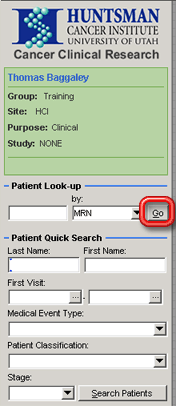
When you know which patient you want and have the patient's MRN, you can quickly perform a search using the Patient Look-up area of the CCR Quick Access Toolbar.
If you want to base your search on other criteria besides the patient's MRN, you will need to perform a Quick Search or Advanced Search — see Using the Quick Search Utility to Search for a Patient or Performing an Advanced Patient Search.
To look up a patient by that patient's MRN:
Fill in the patient's MRN in the leftmost field in the Patient Look-up area of the CCR Quick Access Toolbar. Show me this field.
You must enter the entire MRN. You cannot look up a patient based on only a part of the MRN.
Instead of searching by a patient's MRN, you can use that patient's HCI Person ID. To do so, select HCI Person ID in the by: dropdown field before proceeding to step 2 below.
Click on the Go button next to that field. The patient detail window for the patient record that matches the MRN entered will open.